Download

Game routing for players in Europe

Stop ping spikes.

NoSpike sends your game through its own relays when that beats your connection, follows the server your match is on, and puts the whole route on screen, in figures you can check.

Windows 10 and 11, 64-bit · Why Windows may warn

  • –relays in Europe, online right now
  • –games, with verified servers marked
  • $5.99a month, or 20% off paid yearly

The app

Every figure on the page. Nothing taken on trust.

A route optimizer you can't see into is asking you to believe it. NoSpike's game page shows what it measured, what it chose, and what your game is doing on it, while you play.

Your route

The way your game goes, box by box.

From this PC, in at a relay or straight in, out at the exit, on to the game's server, with the time each leg takes. Every box is a setting: leave them on Automatic and NoSpike picks, or set one and it keeps to it.

  • Rank routes by lowest ping, most stable, or a balance of both.
  • Decide how readily your game moves: steady, balanced or eager.
  • Re-optimize measures every route again, now.
  • Every connection the game has open, with data each way and its ping.
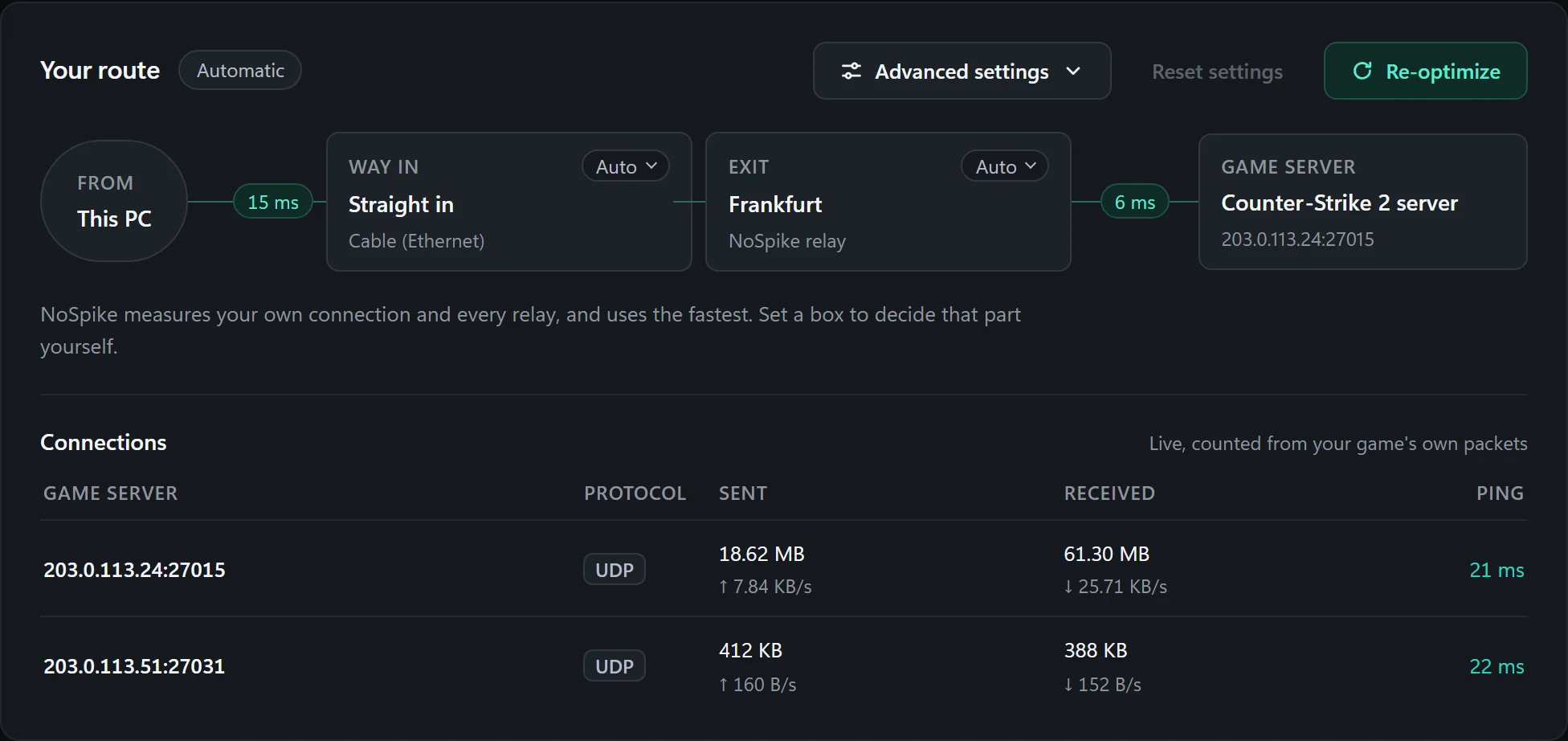
The route card: from this PC, 15 ms straight in to the Frankfurt exit, 6 ms on to the Counter-Strike 2 server, and the connections table with each game server, its protocol, data sent and received and its ping.

Side by side

NoSpike's ping next to yours. Always both.

Your own connection is measured alongside the route, over the same seconds, so the comparison is fair. Jitter and packet loss sit beside the ping, because a steady 30 beats a spiky 25.

When your own connection wins, the app says "Direct is fastest" and tunnels nothing. It keeps checking in case that changes.

Three cards: NoSpike 21 ms via Frankfurt, in use; Direct, your ISP, 38 ms; connection quality with jitter 1 ms against 7 ms and packet loss 0% against 0.4%.

History

Every session, scored honestly.

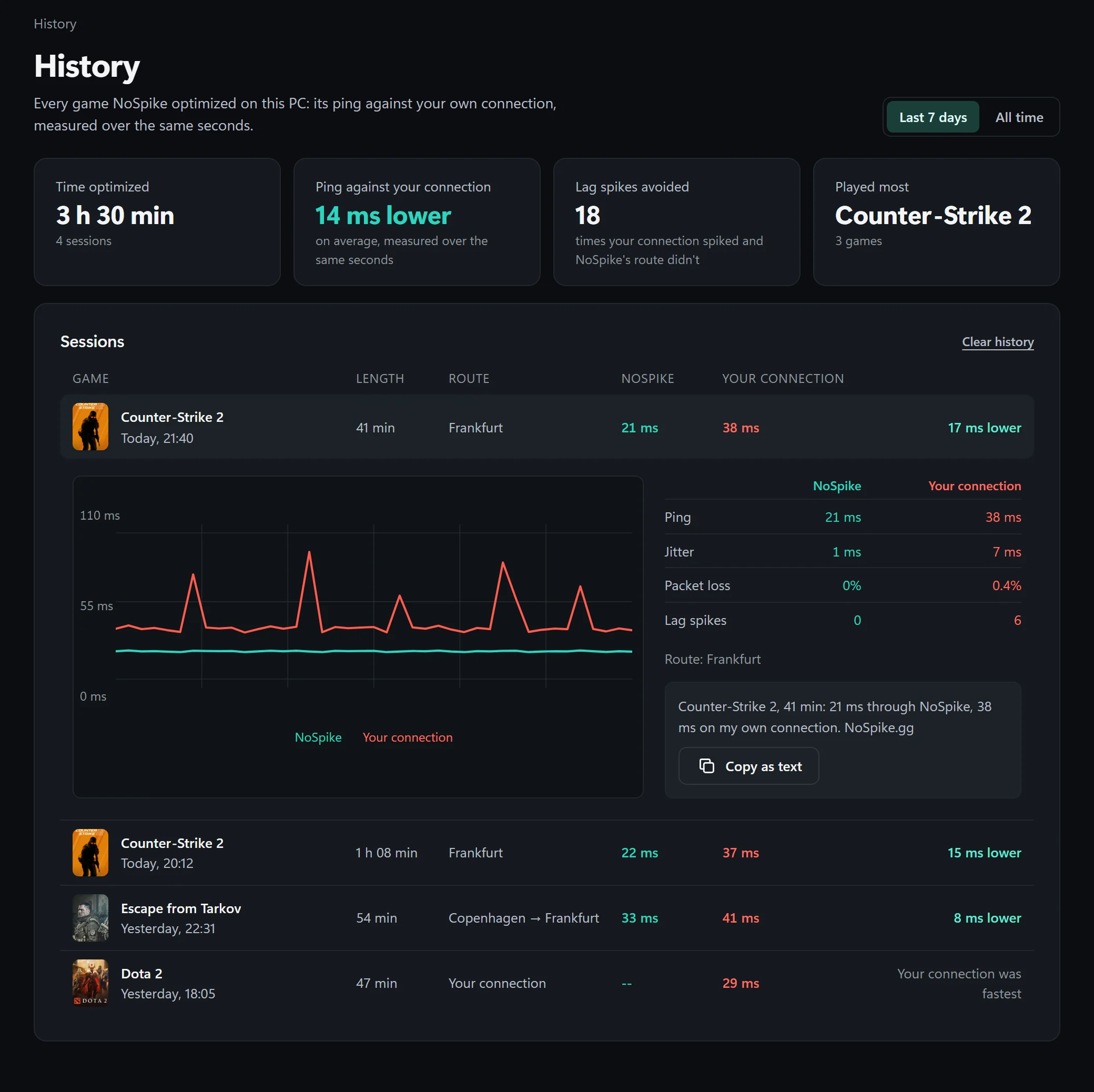
Each game NoSpike optimized: how long, which way it went, its ping against yours, and the spikes your connection had that the route didn't. Sums for the week, sessions your own connection won included, and any session as one sentence to share.

The History page: 3 h 30 min optimized over 4 sessions, 14 ms lower on average, 18 lag spikes avoided; an open Counter-Strike 2 session with its ping chart, and a Dota 2 session where the player's own connection was fastest.

Server finder

Which of the game's servers suits you.

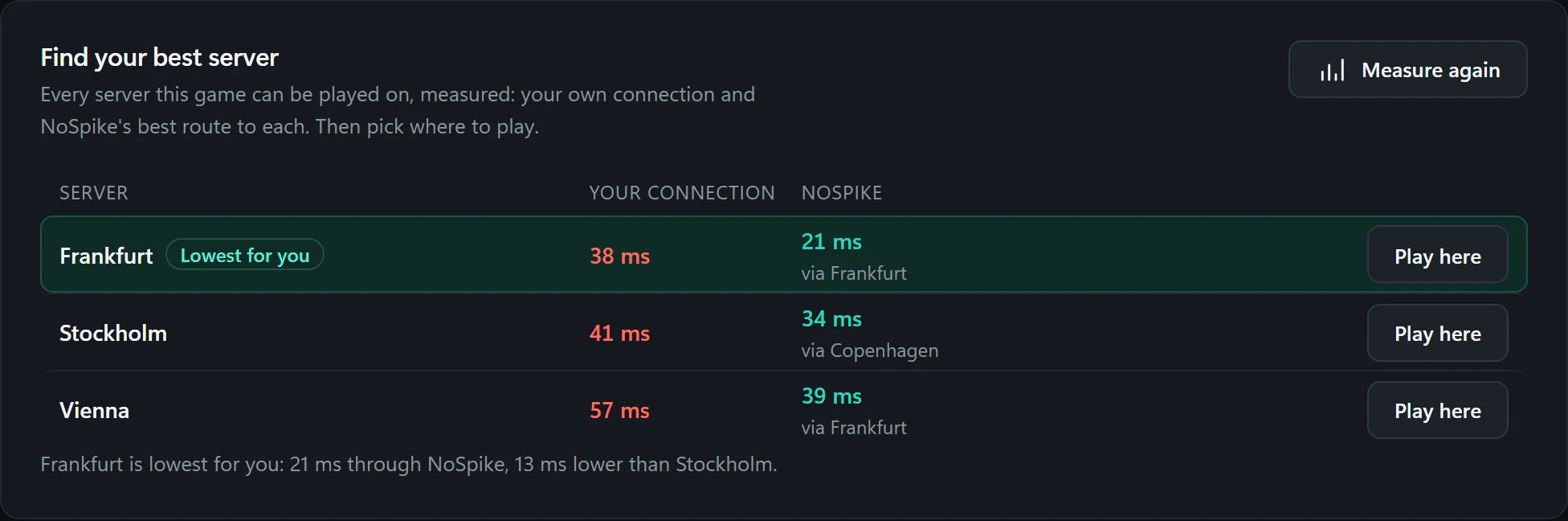
For a game with several regions, every one is measured, directly and through the relays, and the lowest is marked. Pick that region in the game, and routes are measured against it from then on.

The server finder: Frankfurt lowest at 21 ms through NoSpike, Stockholm 34 ms, Vienna 39 ms, each with the player's own figure beside it.

Match-aware

Built around the match you're in.

A route is only as good as the server it was measured against. NoSpike reads which server your match is on from Windows' own network trace, never from the game, and plans around it.

  1. Before the match

    Measured against your usual server

    Nobody knows a match's server before it starts, so the page says what the route rests on: the server your last matches were on.

  2. The match starts

    Confirmed within seconds

    The moment the trace sees the server, every route is measured against it, not at the next minute. The status says "Route confirmed", or that a faster exit takes over after the match.

  3. During the match

    Your exit is held

    The game server sees your exit relay's address, and changing it would drop you. A better exit waits; only the way in to the same exit may move, which the server never notices.

  4. After the match

    The better route takes over

    The exit that was waiting moves in between matches, and servers NoSpike learned during the match start being routed.

Not routed

"Match not routed": said, not hidden.

On a server NoSpike doesn't route yet, your game takes your normal route, and the page, the overlay, the tray and History show your own ping to that server. Never another server's figures passed off as your match's.

The game page's header for Counter-Strike 2 saying Match not routed: your match is on a server NoSpike doesn't route yet, 44 ms on your own connection.

How it routes

Your game's packets, and nothing else.

What happens between your PC and the game server, in plain terms.

Not a VPN

A VPN takes everything on your PC and changes the address websites see. Only the game's server ranges enter NoSpike's adapter; nothing else does, and websites see you as always.

Made for game packets

QUIC with TLS 1.3, carrying game packets as datagrams: never retransmitted, never held back behind a lost one, the way a game expects UDP to behave.

Relays that only reach games

A relay forwards only to the game servers it has been given. It can't be used as a way onto the rest of the internet, by you or by anyone.

In at one relay, out at another

When a better way into the exit exists, your traffic can enter at one relay and leave at another. NoSpike measures those pairs as well as the straight routes.

Two ways at once

Dual path sends each packet two ways to the exit and keeps whichever copy arrives, for about twice the data. The backup line does the same over a second internet connection.

Nothing left behind

If NoSpike closes or crashes, its routes go with it and your connection is exactly as before. No driver service stays behind.

The network

NoSpike's own relays, close to Europe's game servers.

Run by NoSpike, in data centres near where the big games host their European servers. This list is live; which relay is fastest for you is measured in the app.

Map positions are approximate. NoSpike relay Game-server hub

More than routing

The rest of NoSpike works on your PC.

None of it reaches into the game: no hooks, nothing injected, nothing read from its memory. It works on Windows and your screen around the game.

FPS booster

Windows set up for your game while it runs.

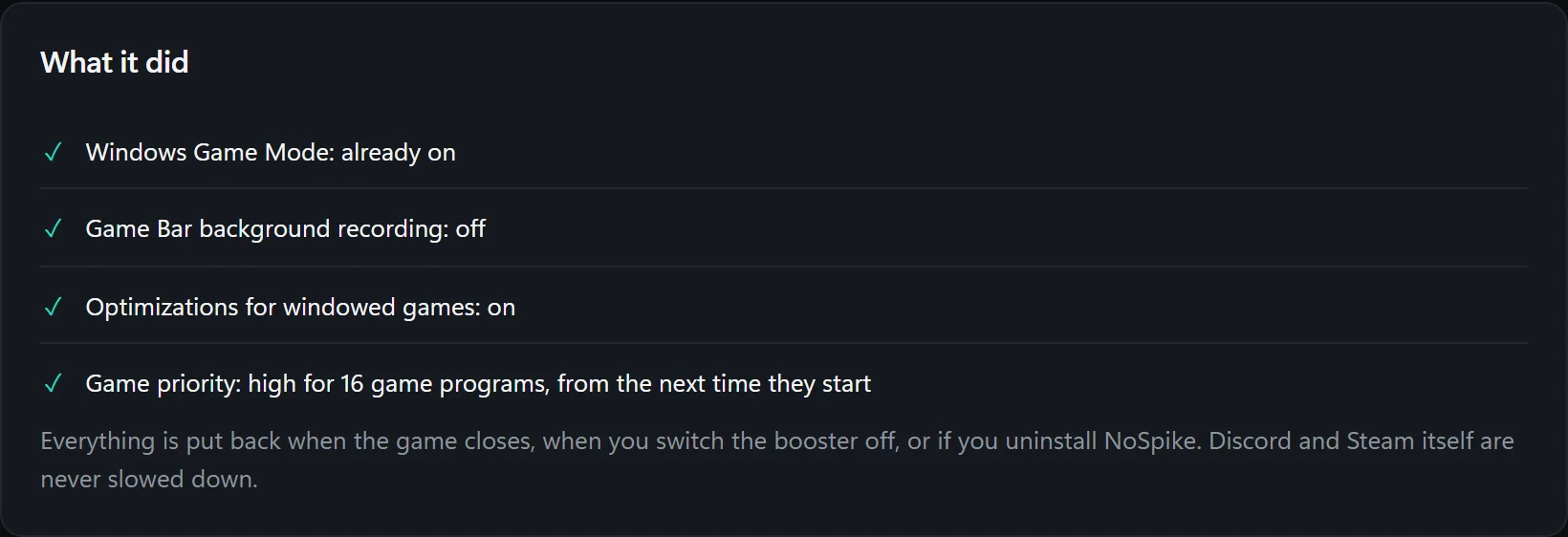
A power plan with every core awake, high priority for the game, Game Mode on, Game Bar's background recording off, background programs slowed. You choose how far it goes: it can also keep those programs off the game's cores, and freeze browsers while you can neither see nor hear them. All of it is put back when the game closes.

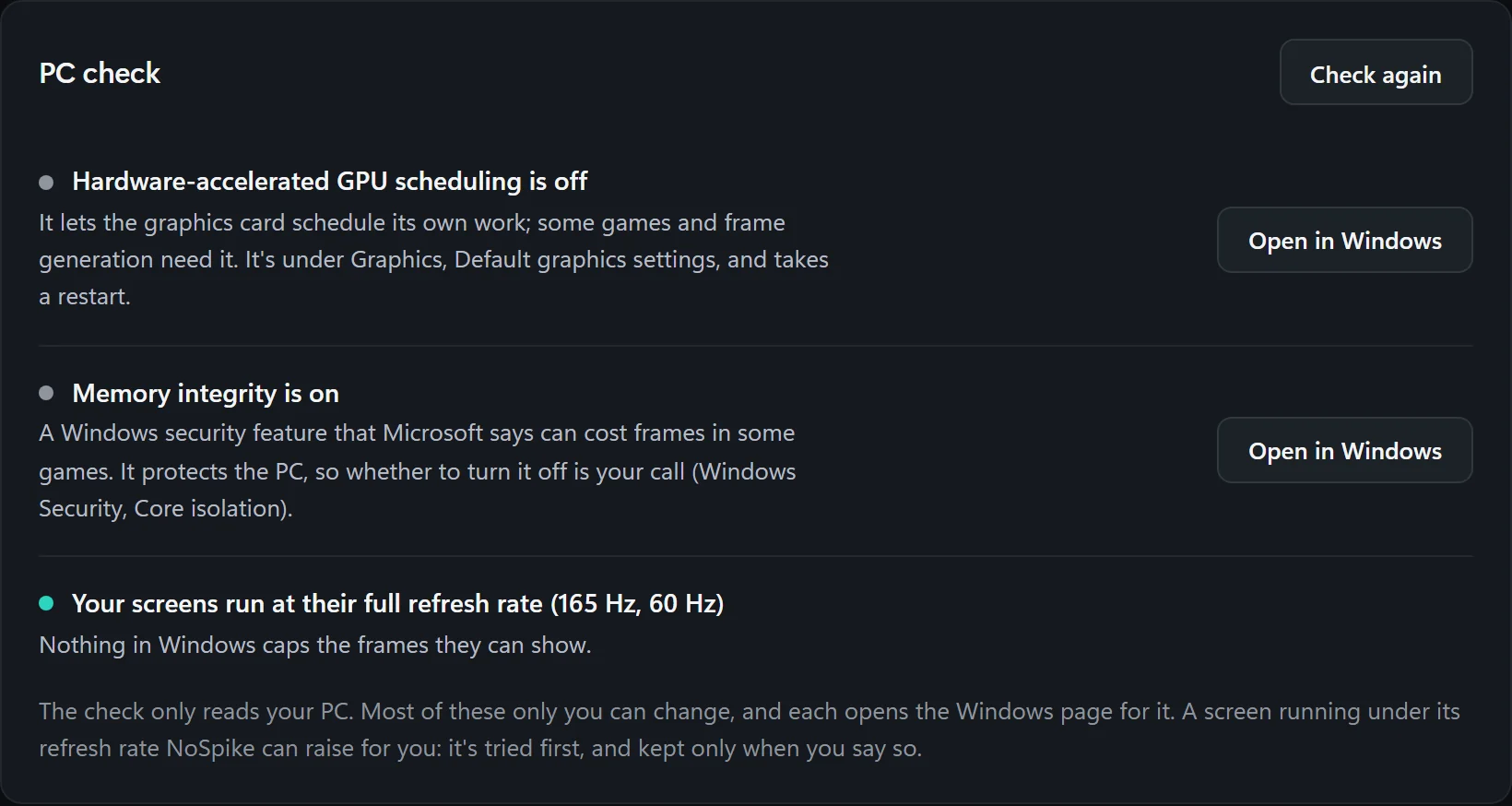
First, a PC check says what holds your PC back, from a screen running under its refresh rate to GPU scheduling, and opens the Windows page that changes it.

The PC check: hardware-accelerated GPU scheduling is off, memory integrity is on, the screens run at their full refresh rate, each with a button that opens the Windows page.
What the FPS booster did: Windows Game Mode already on, Game Bar background recording off, optimizations for windowed games on, high priority for 16 game programs.

Picture

Each game, its own picture.

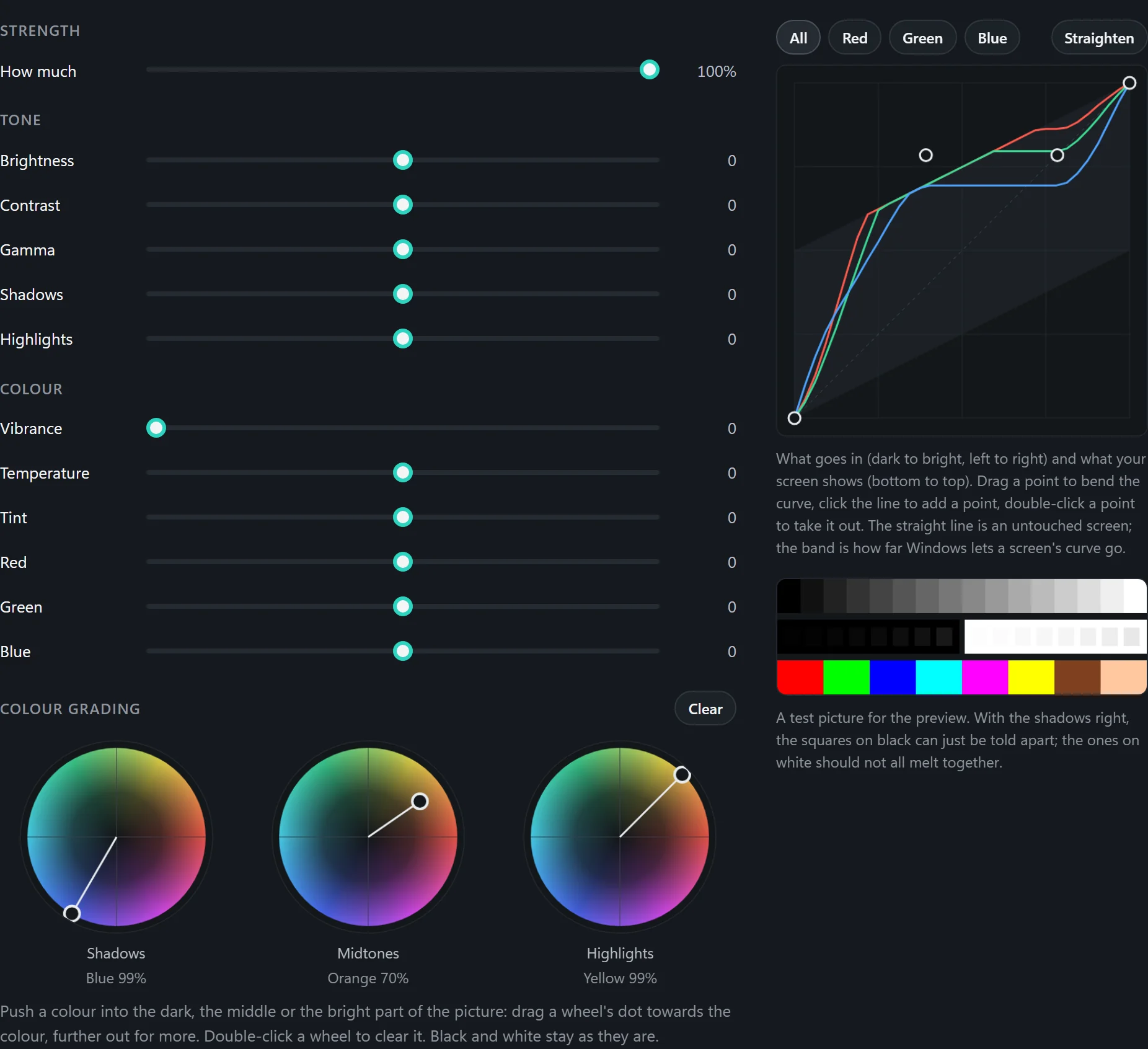
Brightness, contrast, gamma, shadows, highlights, vibrance where the graphics driver offers it, curves you draw, colour grading and ready-made pictures. Two pictures per game with a key to swap them, a picture as a code to give a friend, and in Escape from Tarkov a picture chosen by the map you're on. It's your screen's colour curve, set while that game is in front.

The Picture panel: strength, tone and colour sliders, a curve for each colour drawn by hand, a test picture, and three colour grading wheels for shadows, midtones and highlights.

In-game overlay

Your ping and FPS over the game.

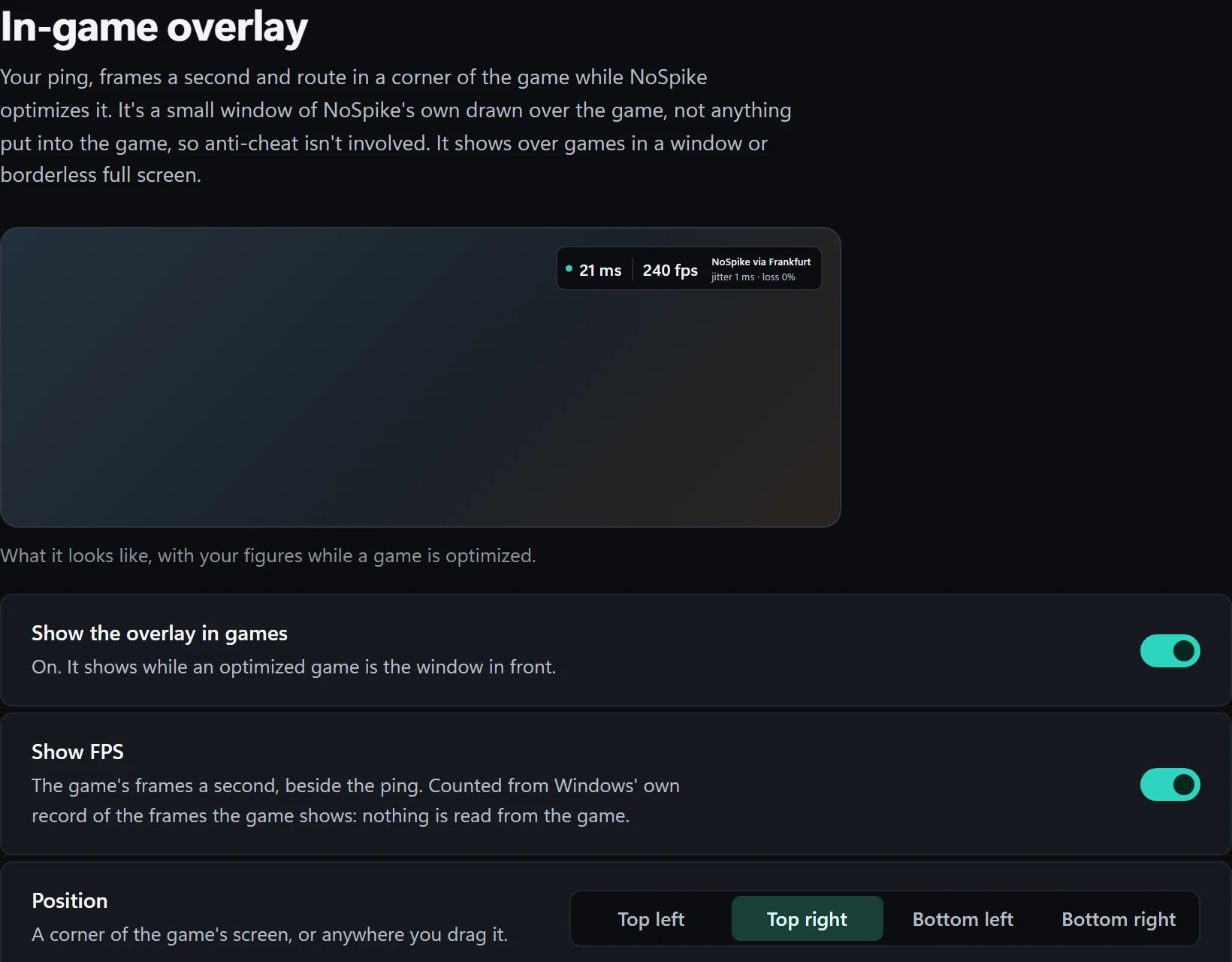
A small window of its own, drawn over the game: ping, jitter, loss, the route, and the game's frames a second, counted from Windows' graphics trace. Any size, any place, as see-through as you like, with a key to hide it. It shows over windowed and borderless games.

The overlay's page: a preview showing 21 ms, 240 fps, NoSpike via Frankfurt, jitter 1 ms and loss 0%, with switches to show the overlay and its FPS, and its position.

Group

The fairest server for your friends.

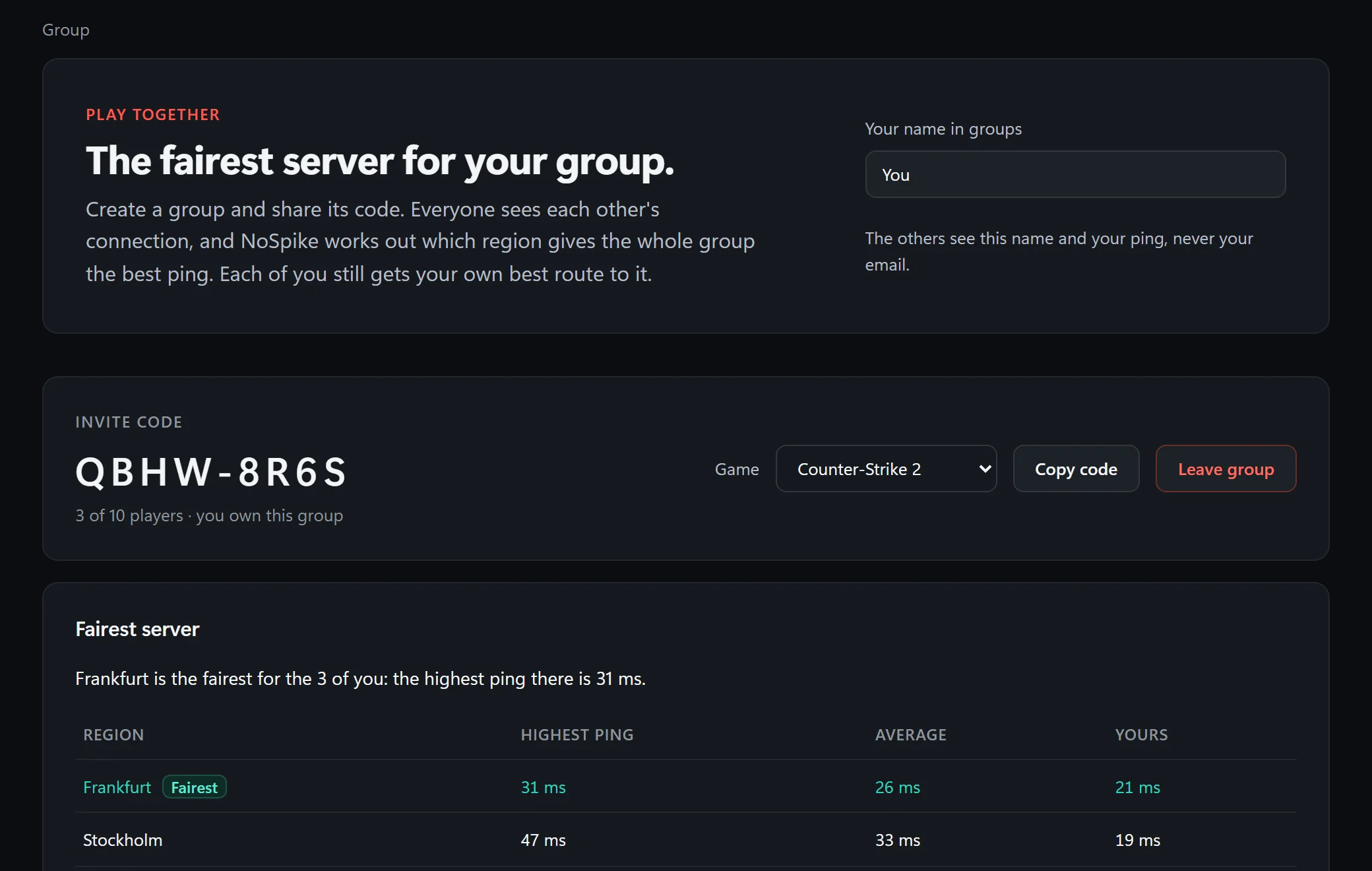
Share a code, and everyone's app measures each region of the game. The group sees which region gives all of you the best ping, and each of you keeps your own best route to it. Others see the name you chose and your ping, never your email.

A group for Counter-Strike 2 with its invite code: Frankfurt is the fairest server for the three players, with the highest, average and own ping for each region.

Shortcuts

Keys that work inside the game, your keys.

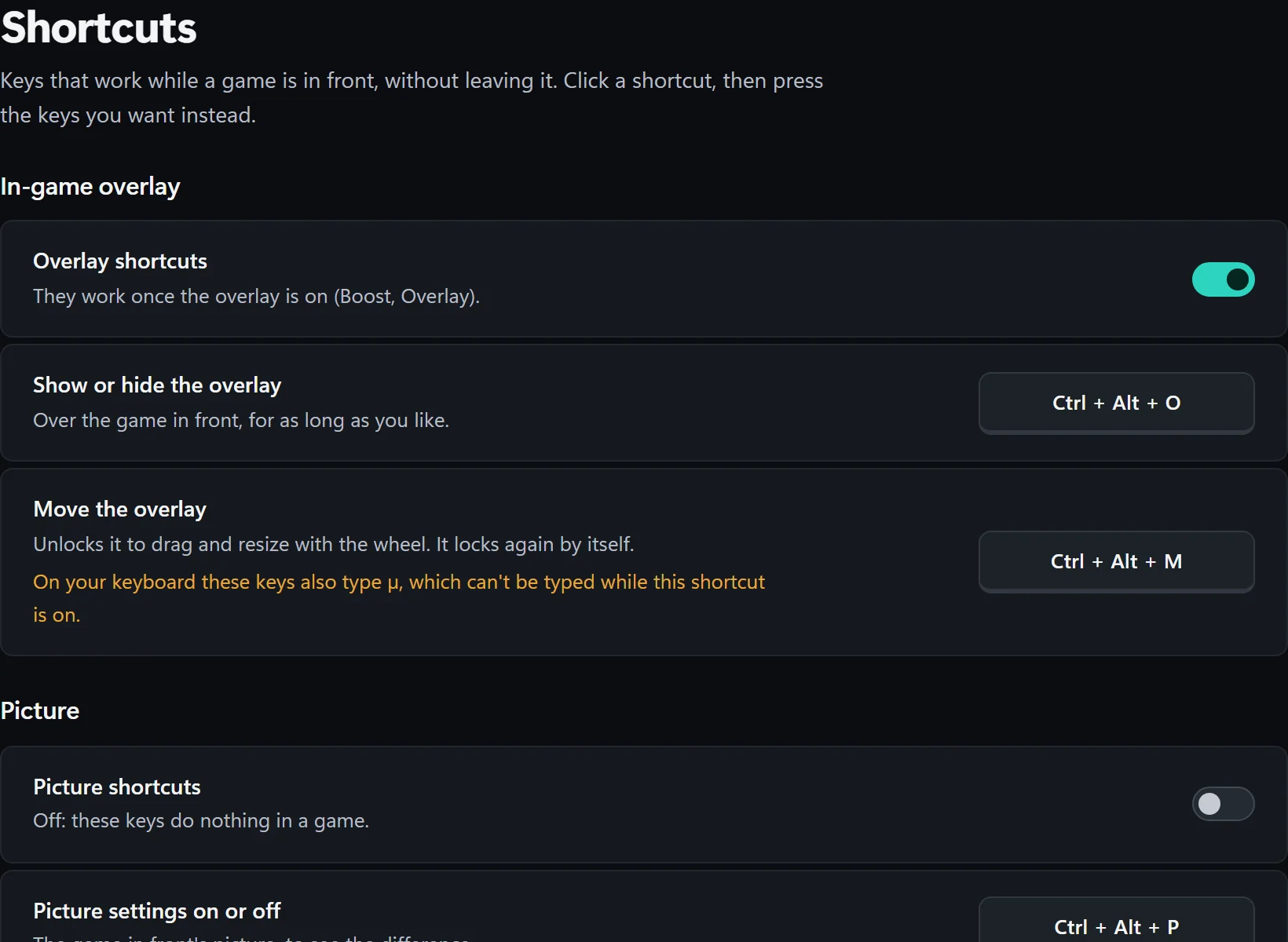
Hide the overlay, move it, switch a game's picture on and off, swap its two pictures, without leaving the game. Click a shortcut and press new keys. Keys that would take a character from your keyboard, like AltGr's @, are refused, and the page says when a default does.

The Shortcuts page: the overlay's and the picture's shortcuts on key caps, and a note that Ctrl + Alt + M also types µ on this keyboard.

Network check

Traces the way to the game's server and to the nearest relay hop by hop, and measures your ping under load to show bufferbloat, so you can see where spikes start.

Your own server

For games where players host the servers, like Minecraft: add the server you play on by its name, and exactly that address is routed and measured.

Backup line

An add-on: a second internet connection, a phone on USB for instance, carries every packet too, so a drop on one doesn't reach your match.

In the background

NoSpike sits by the clock, starts with Windows if you like, and can optimize a game as it starts. Its on/off switch stops all of that at once.

Routing off, the rest on

Only after the booster, the picture or the overlay? Switch route optimization off in Settings and NoSpike routes nothing; the overlay then shows FPS over any supported game.

Updates itself

Installed once, NoSpike keeps itself up to date, never in the middle of a game session, and checks every update against its release signature first.

Games

The games NoSpike routes.

Live from NoSpike's servers. Verified games' servers come from the publisher's own data. Beta games are still being mapped, so NoSpike may not carry all of their match traffic yet; while you play, the game page says what it carries.

Players help map them: with "Help map game servers" on (it is unless you switch it off), the app reports which servers a beta game connects to. Their addresses only, never what's sent to them.

Pricing

One plan. Pay monthly, or save 20% yearly.

Everything on this page is in it. You subscribe in the app once you've made your account, and cancel there any time.

Monthly

$5.99/month

Renews every month. Cancel any time; it runs to the end of the month you've paid for.

Download

Yearly Save 20%

$57.50/year

That's $4.79 a month, paid once a year. Cancel any time; it runs to the end of the year you've paid for.

Download

Both include

  • Route optimization through NoSpike's relays
  • Match-aware routing
  • Multi-hop and dual path
  • History and the server finder
  • Your own game servers, routed
  • FPS booster and PC check
  • Picture, overlay, Group, shortcuts
  • Network check, and every update

Prices include VAT. Payments are handled by Stripe; NoSpike never sees your card. The backup line is an optional add-on, bought in the app.

FAQ

What's left to ask.

Is NoSpike safe with anti-cheat?

NoSpike never reads or changes a game's files or memory. Routing changes where the game's packets go, the booster changes Windows settings, the picture is your screen's colour curve, and the overlay is a separate window. We can't speak for every publisher's rules; if you're unsure, check your game's terms.

What does NoSpike know about me?

Your account's email address, your PC's device key, and what routing needs: which game you optimize and through which relays. Your settings and History stay on your PC. The relays carry your game's packets as they are; most games encrypt their own traffic.

How do I pay, and how do I cancel?

In the app: Settings, Account, then monthly or yearly. Checkout is Stripe's, and from the same place you change your card, see invoices or cancel. A cancelled plan runs to the end of the month or year you've paid for.

Why only Europe?

The relays are in Europe, so the routes NoSpike can offer lead to game servers in and near Europe. From elsewhere, or to servers far away, a European relay rarely helps, and the app would show you that.

What does my PC need?

Windows 10 or 11, 64-bit. NoSpike installs for the whole PC and runs as administrator, which routing and the booster need. Its window uses Microsoft's WebView2, which Windows 11 includes and most Windows 10 PCs already have.

Why does Windows warn during install?

The installer isn't code-signed yet, so Microsoft SmartScreen may show "Windows protected your PC". Only go on if you trust the source and have checked the published file hash: Windows offers More info, then Run anyway.

To check that your file is the one we published, compare its SHA-256 with ours:

Loading…

How do I remove it?

From Windows' Installed apps, like any program. Uninstalling puts back what the FPS booster changed and removes the task that starts NoSpike with Windows. A subscription is cancelled in the app, not by uninstalling.

Get NoSpike

Install, sign up, pick your game.

  1. Run the installer on Windows 10 or 11, 64-bit.
  2. Create your account in the app and choose monthly or yearly.
  3. Open your game's page and press Optimize connection, or let NoSpike do it when the game starts.
Download for Windows
Version
…
Size
…
SHA-256
…

Checking for the latest version…

Not code-signed yet, so SmartScreen may warn: a matching hash checks the file is ours. More about the warning